Coordinate Systems
Everything in QAROS is placed somewhere, and "somewhere" always means a pose in a specific space. There are four nested spaces you need to know. Getting them straight makes the whole API — app volumes, panels, gestures, streaming poses — fall into place.
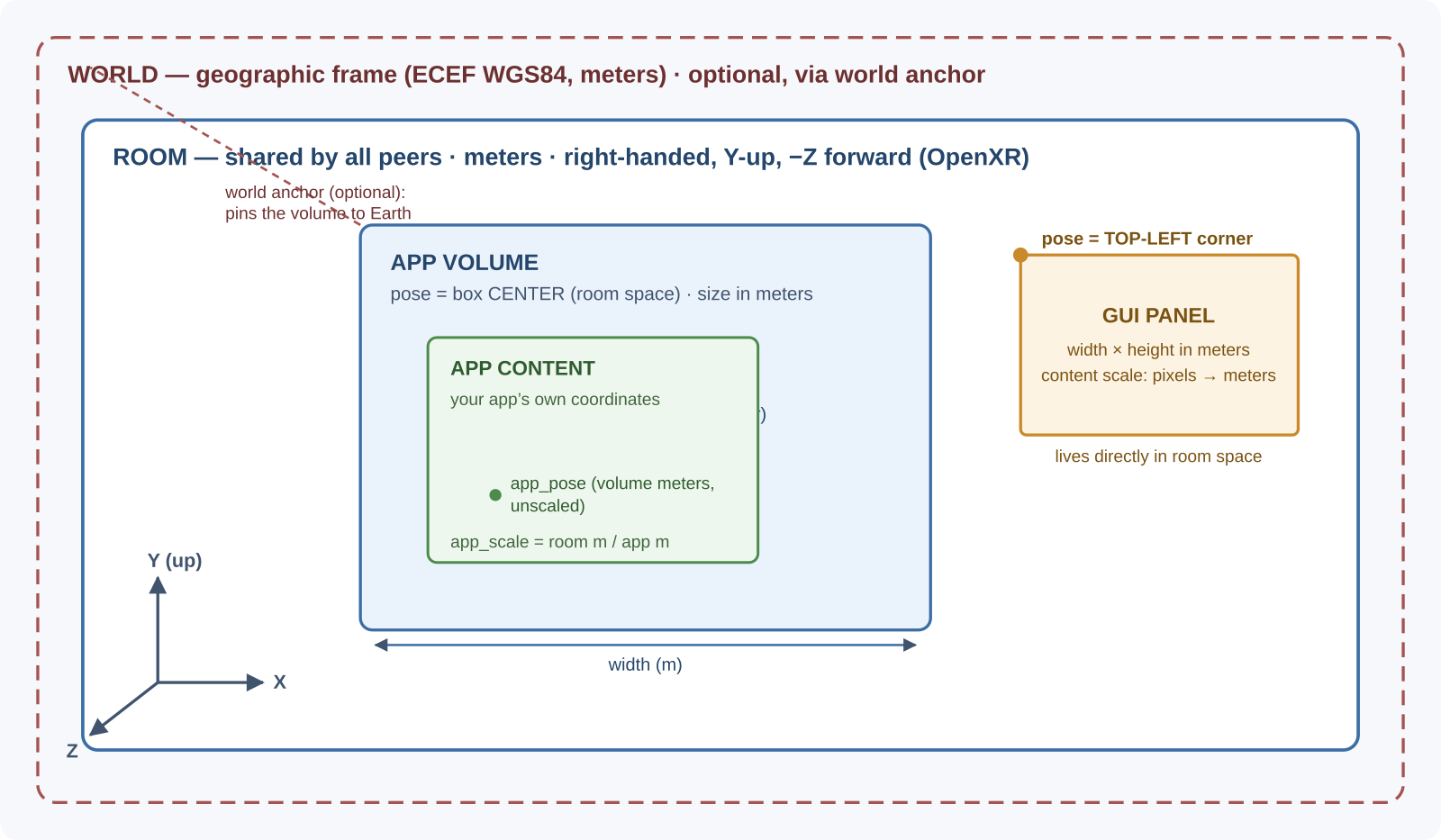
The space hierarchy
WORLD (geographic, optional)
  └── ROOM (shared by all peers in a session)
        ├── APP VOLUME (a box placed in the room)
        │     └── APP CONTENT (your application's own space, scaled)
        └── GUI PANEL (a 2D quad placed directly in the room)
Room space — where everything lives
Room space is the shared frame of reference of the physical room. Every peer in a session agrees on it: when one user places an app volume on the table, every other user sees it on the same table. App-volume poses and GUI-panel poses are expressed in room space. The rule for everything else:
- What a render sender hands your application — view and head poses, hand aim and joint poses, joint radii and velocities — and mapped gesture points are in that volume's app content space. Use them as they come.
- What arrives through data streams and shared objects — app volume and GUI panel state, another peer's published data — is in the publishing peer's room space, and is never converted for you.
The C header names the space of every field that holds one.
Conventions:
- Room and volume units are meters. Render-sender poses and gesture points use app-content units. If a renderer uses a different unit from world meters, its geographic conversion must declare that relationship separately.
- Poses are a position vector + orientation quaternion (
QarPose). Quaternions are stored as{x, y, z, w}(scalar last). - Room space follows OpenXR conventions: right-handed, Y-up, −Z forward. The QAROS math types deliberately mirror OpenXR's (
XrPosef,XrVector3f), and the room frame is the runtime's OpenXR reference space.
The room origin itself is established by the underlying XR runtime and the platform's relocalization — it is not something applications set through the API. How multiple headsets co-locate to the same room origin is therefore a property of each device platform's relocalization, not of the QAROS API. The C header states the same convention: every 3D space follows OpenXR (right-handed, Y-up, −Z forward), and a pose is a position vector plus an orientation quaternion stored x, y, z, w.
World space — a geographic reference
World space is an optional absolute geographic frame. An app volume can carry world-anchor metadata (AppWorldAnchor, containing a QarGeoAnchorFrame) that identifies an Earth-fixed reference frame in ECEF WGS84 meters (Earth-Centered, Earth-Fixed Cartesian coordinates):
origin_world— the anchor's origin as an ECEF position (double precision, meters),axis_x/y/z_world— the anchor's local axes as unit vectors in the ECEF frame,handedness—QAR_HANDEDNESS_RIGHTorQAR_HANDEDNESS_LEFT(right-handed meansX × Y = Z).QAR_HANDEDNESS_UNSPECIFIEDis rejected withQAR_STATUS_ARGUMENT_NOT_SUPPORTED.
This shared reference lets applications agree on a geographic location and orientation. In the current SDK, the anchor is stored and replicated with the volume; setting or clearing it does not change the volume's pose, app_pose, or app_scale. The render sender does not automatically use it to transform view poses, align tracking rooms, or reproject pixels against geographic coordinates. Applications must implement the geographic conversion and any alignment they require. If you never set an anchor, the room remains the outermost frame used by the rendering transforms.
The anchor's axes are unit vectors, not a place to store display scale or a units conversion. If an application renders in units other than true world meters, the anchor alone is not a complete georeference. Publish the additional conversion as application-specific metadata and make consumers apply it explicitly. For example, if one render-coordinate unit represents S0 = 1000 world meters, retain that worldMetersPerAppUnit value separately; do not multiply the anchor axes by S0, put ECEF values into app_pose, or change streaming depth_scale to carry it. Names such as an integration's appCoordinate snapshot describe its own protocol, not an SDK field or an automatic coordinate conversion.
A one-to-one interpretation of app-content coordinates as local Earth-meter offsets requires those coordinates to actually use world meters, as well as an explicit choice of how they relate to the anchor. The SDK does not define a complete anchor-to-app-content mapping for applications; app_scale still controls physical display size independently.
App volume space — a box in the room
An app volume is placed in the room by two values:
pose— the pose of the cuboid's center in room space,size— width × length × height in meters.
App volume space has its origin at the cuboid centre (not a corner, not the floor): +X spans the width, +Y points up along the height, +Z spans the length (horizontal depth). The box covers ± half of each extent.
Moving or rotating the volume moves the box and everything rendered inside it — like picking up and turning a diorama.
App content space — your application's world inside the box
Inside the volume, your application keeps its own coordinate system. Two values relate app content to the volume:
app_pose— where the app's origin sits, expressed in app-volume meters (relative to the volume, not scaled byapp_scale),app_scale— a single scalar meaning room-meters per app-meter:app_scale = 1.0→ 1 meter in your app appears as 1 meter in the room,app_scale = 0.5→ your content appears at half size,app_scale = 10.0→ your content appears ten times larger than life.
app_pose.position is a Euclidean translation in volume meters, relative to the box's center. It is not latitude/longitude, an ECEF position, or an offset whose unit is inherited from AppWorldAnchor. The render sender converts room poses through the volume pose and then the inverse app pose, and divides positions by app_scale to produce app-content units. Changing app_scale does not multiply the stored app-pose translation.
This separation is the key trick: users can grab the volume to move the whole box around the room (changing the volume's room-space pose), or use gestures mapped to app_pose/app_scale to pan and zoom the content within the box — for example shrinking an entire factory into a tabletop model, then zooming into one machine — without your application changing how it renders.
GUI panels — 2D quads in room space
GUI panels do not live inside app volumes; they are positioned directly in room space, as siblings of app volumes. Two conventions differ from volumes:
- A panel's pose is the midpoint of its top edge (an app volume's pose is its center). The surface hangs below the pose: x in ±
width_meters/2, y from −height_metersto 0. Keep this in mind when aligning panels to volumes. - Panel space is right-handed with the front face along −Z (towards the viewer), +Y up, and +X along the top edge to the viewer's left.
- A panel has a physical size in meters (
width_meters×height_meters) plus a content scale that maps the panel's pixel content onto those meters — the same panel can show a dense dashboard or a large-print menu at the same physical size. - Panel content space is the pixel raster on the panel: origin at the top-left corner as the viewer sees it, +X right, +Y down. Panel interaction points (
QarGuiPanelPoint) are reported in it.
Gestures and spaces
The gesture system lets you map gestures onto app-volume transforms, or consume them yourself:
- App volume gesture events carry a start point and an action point in app content space (app units, under the app pose and scale the gesture began with), so you can hit-test them against your model directly. Their accumulated translation and rotation deltas are in app volume space.
- A mapping rule routes a gesture either to the content (
app_pose/app_scale) or lets your application consume the raw event. Rules can constrain translation/rotation to specific axes, set aprecisiondivisor (hand-centimeters per app-centimeter), and choose how sensitivity relates to the currentapp_scale(constant, inverse, or proportional).
The default configuration maps dual-pointer distance to app_scale and single-pointer 6-DoF to app_pose — grab-to-move, pinch-to-zoom out of the box.
Streaming and spaces
A render sender hands out its per-eye view poses, head pose and the viewer's hands in its app volume's app content space, the space your application renders in, so you use them as they come. While the volume does not resolve, it hands out nothing: begin-frame fails with QAR_STATUS_RENDERING_PRODUCER_APP_VOLUME_UNRESOLVED, hands report untracked, and no room-space pose is substituted. Field-of-view angles are in each view's own camera frame (looking along −Z), in radians.
When your application streams frames, the projection metadata you provide (per-eye pose, field of view, near/far planes) is what ties your rendered pixels back into the room: the mixer uses it, together with the frame's depth channel, to re-project your image to the viewer's latest head pose and to mask it to your app volume's box. Getting poses and near/far values right is therefore not cosmetic — wrong metadata produces swimming or clipped content. See Rendering Streams.
Cheat sheet
| Value | Space | Meaning |
|---|---|---|
App volume pose | Room | Cuboid center |
App volume size | Room | Extents in meters |
app_pose | App volume (unscaled meters) | Where the app origin sits in the volume |
app_scale | — | Room-meters per app-meter |
| World anchor | ECEF WGS84 (meters, double) | Shared geographic reference metadata; no automatic render-pose conversion |
| GUI panel pose | Room | Midpoint of the top edge of the quad |
| Panel size + content scale | Room / pixels | Physical size; pixel density |
| App volume gesture points | App content | Where the gesture started / acts |
| App volume gesture deltas | App volume | Meters + quaternion deltas |
| Panel interaction points | Panel content (pixels) | Top-left origin, +Y down |
| Stream view/head poses, hands | App content | Per-eye projection used for warping; viewer hands |
| Data streams, shared objects | Publisher's room | Never converted for you |
| FOV angles | View | Radians, view looks along −Z |