Quick Start
qaros-adaptation is a Python 3 tool (standard library only) in the kit's tools/ folder. Node.js
is needed only for test.
| From | Run |
|---|---|
| An install | python -I "<install>/share/qaros/adaptation-kit/tools/qaros-adaptation.py" <command> ... |
The qaros repository | python -I adaptation-kit/tools/qaros-adaptation.py <command> ... |
- The kit is the folder the tool is in.
--kit <dir>(before or after the command) or theQAROS_ADAPTATION_KITenvironment variable picks another, for instance the kit of the oldest QAROS you support. - Below,
qaros-adaptationstands for the full command. - A coding agent can do the authoring in the Visualizer for you: Develop with AI agents.
1. Create
qaros-adaptation init threejs my-viewer --address "https://example.com/viewer/*"
| Template | For | Yours to write |
|---|---|---|
threejs | a three.js page, WebGLRenderer or WebGPURenderer | scripts/scene-selection.js, only when the default scene or renderer choice is wrong |
webgl | a raw WebGL2 page (no engine) | scripts/render-frame.js: draw the page's scene with a given camera |
webgpu | a raw WebGPU page that exposes its device and draw function | scripts/app-bridge.js: the page's device, camera and draw entry point |
webgpu-redirect | a WebGPU page with its own render loop that exposes nothing | scripts/site-camera.js: the page's camera buffer and its layout |
initasks in a terminal for what is missing:--name,--address,--engine,--display-name,--id. Give the adaptation a reverse-DNS--idyou own.- The new folder holds
profile.json,scripts/,test/and a README naming each script.
2. Check
qaros-adaptation check my-viewer
- Errors:
profile.jsonagainst the schema, everyLibrarypresent in the kit, each library after the libraries it needs, every script file present; a source folder carryingFilesorSignaturethat no longer match is refused (packagewrites them). - Warnings: the known pitfalls listed in common mistakes.
--ignore <code>skips one;--strictfails on warnings too.
Example output:
my-viewer: warning: [iframe] AddressPattern 'https://example.com/gallery/*' matches index or gallery pages; ...
my-viewer: 0 errors, 1 warnings
3. Test
qaros-adaptation test my-viewer
Runs the adaptation's test/*.test.mjs and the kit's own tests of every library it uses, with
node --test. --no-kit-tests runs only yours.
4. Package
qaros-adaptation package my-viewer --out dist
qaros-adaptation package my-viewer --out dist --sign key.pem --signer "Example Ltd"
- Writes
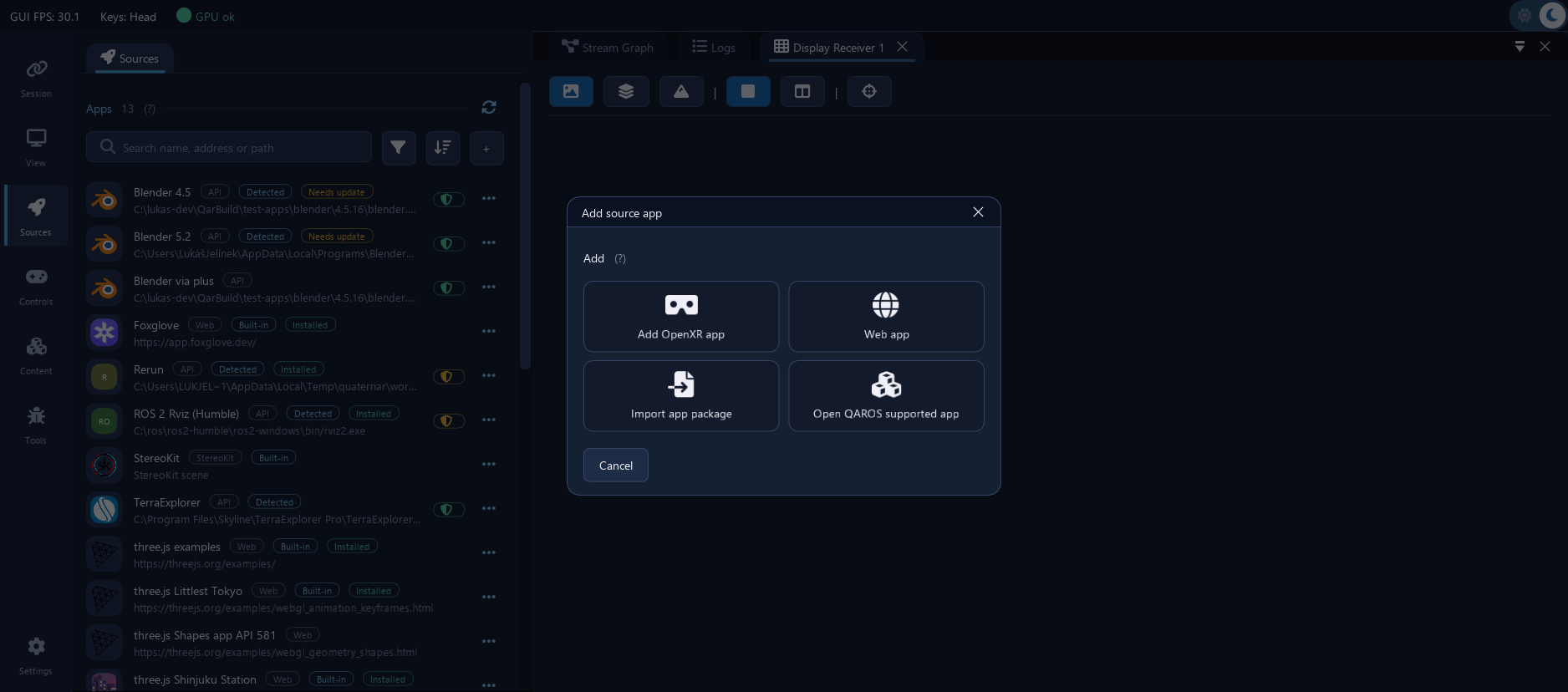
<id>-<version>.qarapp: the folder, a manifest of every file's SHA-256, and with--signan ECDSA P-256 signature. The package is verified the way QAROS imports it. Libraryreferences stay references.__PAGE_REGION_WIDTH__/__PAGE_REGION_HEIGHT__in your own scripts are replaced fromPageRegion.--unpackedwrites the folder instead;--versionsetsVersion.- Import it in the Visualizer: Source Applications, +, Import app package (Importing a web app package). An unsigned package or one from a publisher the hub does not trust asks first.
5. Verify
With the adaptation running as a web app source, in a Visualizer in Developer mode with its MCP endpoint enabled:
qaros-adaptation verify my-viewer --address "https://example.com/viewer/"
- Reads the streamed atlas and reports depth coverage of the coloured pixels, the thin-line check, alpha coverage and the depth pack. It exits non-zero when a coverage is too low.
Example output (one user, two eyes):
depth pack readback OK: ...
target 1 left: 1840 coloured blocks, depth 100.00%, thin 100.00% of 212
target 1 right: 1838 coloured blocks, depth 100.00%, thin 100.00% of 210
--instance <id>picks a source;--host/--portthe Visualizer's MCP endpoint.
Pin a library
qaros-adaptation pin my-viewer threejs-render-frame@1
- Replaces the
Libraryreference with a copy atscripts/[email protected], named as the script'sFile. Its header shows the exact version. - A pinned copy gets no fixes from QAROS updates: pin only a version you verified, and re-pin after testing a newer one.
Before you share it
To offer it to every QAROS user, see Contribute an adaptation.
AddressPatternmatches the site's pages and nothing more.checkandtestpass against the kit of the oldest QAROS you support (--kit).RenderRate,RenderScaleandAppScaleare set on purpose (recipes).- Tested with one, two and four users, and the page still works in the preview while streaming.
Versionraised for every change you hand out: importing the same version changes nothing, and an older one asks first.