Welcome to QAROS
QAROS is Quaternar's AR/VR middleware: it lets you add multi-device, multi-user AR/VR capabilities to an existing 3D application without rebuilding it. Your application keeps rendering the way it always has; QAROS streams its output to headsets, tablets, and phones, composites content from several applications into one coherent shared space, and handles discovery, security, input, and session management for you.
Don't rewrite. Extend.
How this documentation is organized
The documentation is split into three self-contained guides by audience, plus generated API references. Each guide has its own navigation, so you stay in one guide to accomplish your goals.
- User Guide - for people who join a QAROS Hub from a device, and for anyone wanting a non-technical picture. It explains the QAROS world without code: joining your first Shared Space, connecting to the Hub, onboarding your device, understanding the shared space, and working in it.
- Developer Guide - for engineers integrating the QAROS API (C, C#/.NET or Rust) into their application: SDK setup, API conventions, coordinate systems, onboarding and sessions, streaming rendered frames, GUI panels, and app volumes. Code samples are selectable per language, and tutorials are backed by example programs compiled as part of this repository, so every referenced snippet is real, valid code.
- Administrator & Operator Guide - for people who install, secure, configure, run, and maintain a Hub: system requirements, installation, Hub operation, networking and Hub federation, the security model, device management, the mixer, and maintenance.
- C API Reference - the complete API reference, generated from the C headers with Doxygen.
- C# API Reference - the reference for the
Quaternar.Qarosnamespaces, generated from the binding's XML documentation comments.
A shared Glossary defines the cross-cutting terms.
The elevator pitch, in one diagram
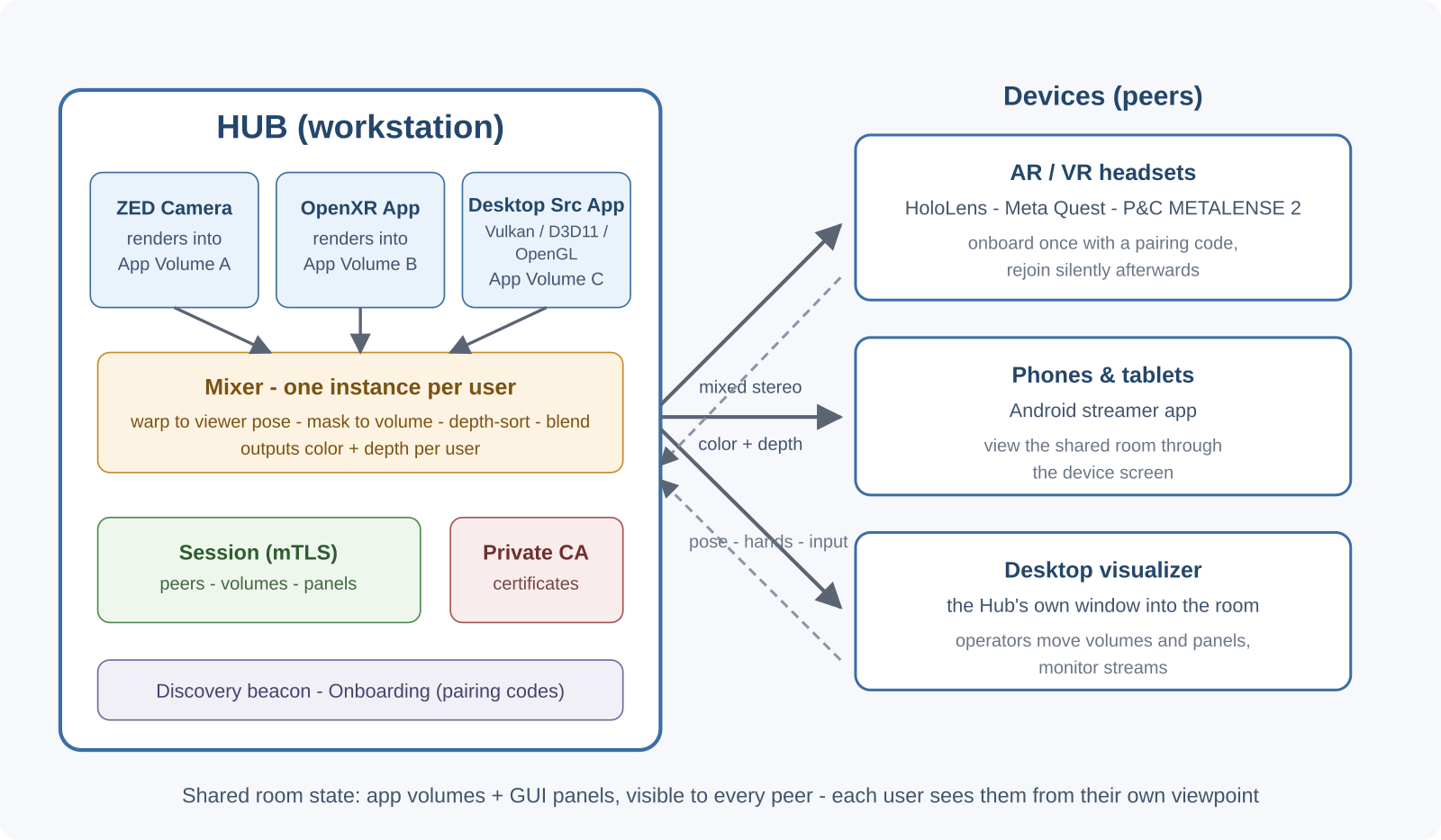
A Hub (a powerful workstation) runs your 3D applications and the QAROS runtime. Devices - HoloLens, Android phones and tablets, VR headsets, desktop viewers - onboard to the Hub with a short pairing code and join a shared Shared Space. In the developer/runtime model, that Shared Space maps to a session. Each application renders into an app volume (a 3D region inside the space, potentially spanning multiple rooms); the mixer composites all volumes into one personalized, latency-compensated view per user, and GUI panels provide shared 2D interfaces floating in 3D space.
Where to start
| I want to... | Start here |
|---|---|
| Understand what QAROS is made of | The QAROS World |
| Join a Shared Space from my device | User Guide: Getting Started |
| Connect a HoloLens / Android device | Onboarding Devices |
| Install and run a Hub | Installation |
| Run and manage a Hub | Operator Guide: Overview |
| Do a task in the Visualizer, step by step | Visualizer Tutorials |
| Understand the security model | Security Model |
| Integrate the API into my app | Developer Guide: Getting Started |
| Stream my rendered frames | Rendering Streams |
| Stream a Unity scene | Unity |
| Use Ogre, Qt or RViz2 with QAROS | Ogre, Qt and RViz2 on QAROS |
| Stream an Ogre scene to QAROS | Streaming an Ogre Scene to QAROS |
| Run RViz2 with the QAROS plugin | Running the RViz2 Plugin on Windows |
| Browse the full C API | C API Reference |