Overview
This guide is for the people who install, secure, configure, run, and maintain a QAROS Hub - the machine that brings applications and devices together into one shared, streamed room. This page gives you the mental model; the rest of the guide fills in the detail.
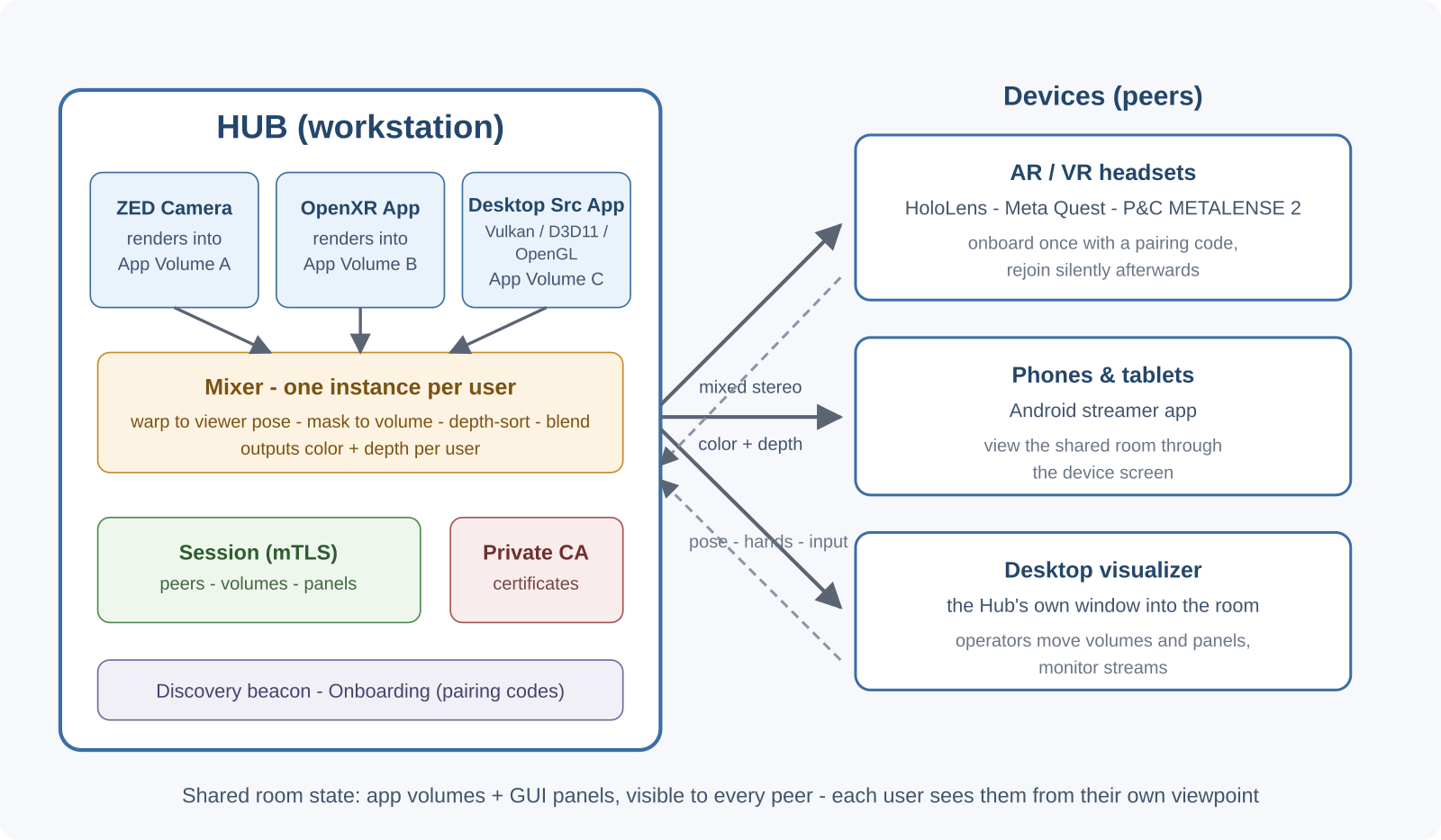
The Hub is three processes
A Hub is not one program. Three processes ship together and start in a chain:
| Process | Role |
|---|---|
qaros.exe | The tray supervisor. It is the always-on parent: it starts the runtime launcher, restarts it with backoff if it crashes, and gives you the tray menu. This is what you launch (or what autostart launches). Earlier versions named it qaros-hub-service.exe. |
qar-runtime-launcher.exe | The runtime. It hosts the session and message router, runs the private CA (in process) and onboarding services, broadcasts the discovery beacon, keeps the audit log, and orchestrates the streaming pipeline (source apps, mixers, targets). Everything operationally interesting happens here. |
qar-streaming-viz.exe | The visualizer - the interactive desktop window where you see and manipulate the shared room, and where you join another Hub or manage member Hubs. |
The startup chain is: you start the tray service -> it starts the launcher -> the launcher restores or creates a session, registers source-app volumes, starts streaming and onboarding services, begins broadcasting discovery, and invites a local visualizer. If the launcher dies, the tray service brings it back.
The mixer, one per user
Inside the runtime's streaming pipeline sits the mixer: the component that composites several independent application streams into one coherent, latency-compensated stereo view. There is one mixer instance per connected user, so the Hub's GPU load scales with the number of users. You never manage the mixer directly - the pipeline planner inserts and places it for you. See The Mixer.
The per-Hub Certificate Authority
Each primary Hub operates its own private certificate authority, built into the Hub process (no separate CA program, no port). It is the trust root for its session: a device onboarded to this Hub carries a certificate this Hub signed. No internet, cloud, or corporate PKI is required. A short pairing code - typed once, never sent over the network - bootstraps each device's full cryptographic identity. See Security Model for the trust model and onboarding flow.
Primary and member Hubs
With several PCs, run a Hub on every PC and make one of them the primary. The others use Join hub… and become member Hubs: they run everything locally (source apps, mixer, targets, headsets at that PC) but have no CA of their own. The primary signs every certificate, keeps every app approval, revocation and the session, and its operator allows or removes members. A member leaves with Leave and start own session. See Networking & Federation.
Where data lives
Everything the Hub keeps between runs - identity slots, CA state, session state, approved local apps, the audit log - is kept out of the install directory, under the per-user data root (%LOCALAPPDATA%\Quaternar\...); logs go to %TEMP%\quaternar\logs (Installation: Where data and logs live). That is why an upgrade keeps it, and it is what you back up. See Maintenance & Updates.
What the operator owns
Four things are yours to manage:
- Configuration - source apps (see Source Applications), target devices, and other Hub behavior, managed through the visualizer and persisted across restarts.
- Network and ports - firewall rules for the QAROS port range, discovery scope, and (for off-LAN) a relay.
- Device and Hub trust - pairing devices, connecting peers, forgetting or blacklisting devices, allowing and removing member Hubs, and reading the audit log.
- Updates - moving between versions with the installer and the device apps, and backing up Hub identity.
What's in this guide
| Page | What it covers |
|---|---|
| System Requirements | Hardware, OS, network, and per-device requirements for a Hub. |
| Installation | The per-machine installer, what it installs, upgrade and uninstall; Unity ZIP, C# NuGet, device apps. |
| Player Installation to Device | Operator-side player installation section with separate pages for HoloLens 2, P&C Solutions METALENSE 2, and Meta Quest. |
| Running the Hub | Starting the tray service, the startup sequence, the visualizer, reconnects, logs and crash dumps. |
| Source Applications | Launching, configuring and stopping the apps that stream into the room. |
| Networking & Federation | Ports and firewall, LAN vs relay, and joining Hubs as primary and members. |
| Security Model | The four-layer trust model, the per-Hub CA, and onboarding. |
| Managing Devices | Pairing codes, connecting peers, and forgetting/blacklisting devices. |
| The Mixer | How multiple streams are composited into one per-user view. |
| Maintenance & Updates | Upgrades, the compatibility promise, backups, and logs. |
For device-owner instructions (bringing a headset or phone into a session), see the User Guide. For integrating the C API, see the Developer Guide. Unfamiliar terms are defined in the Glossary.