Security and Onboarding
QAROS deployments often run on factory floors, in hospitals, and on corporate networks — places where "trust the LAN" is not acceptable. The security model is therefore built on a simple promise: a short pairing code, typed once, bootstraps a full cryptographic identity — and the code itself never travels over the network.
The four layers
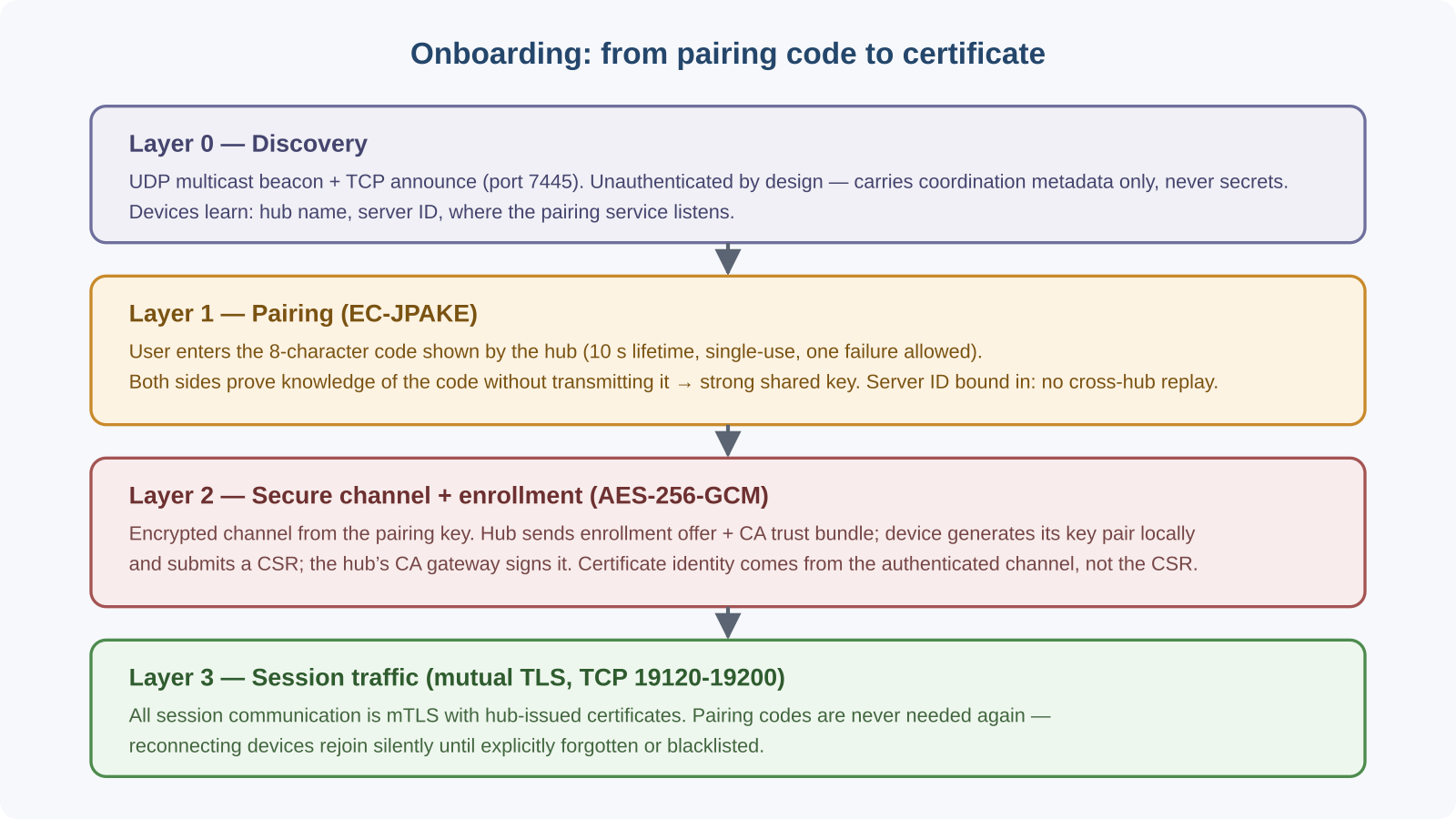
Layer 0 — Discovery (open by design)
Devices find the Hub with zero configuration: the Hub broadcasts a beacon on the local network (UDP multicast 239.77.77.77:7445) and answers discovery requests on its onboarding TCP port, which it claims from its port range and names in the beacon. This layer is deliberately unauthenticated and carries no secrets — only coordination metadata (device name, invitation nonce, server ID, where to reach the pairing service). A forged beacon can at worst redirect a connection attempt; pairing still fails without the correct code.
Layer 1 — Pairing (EC-JPAKE)
The Hub issues short-lived pairing codes (8 digits). The code travels out-of-band — over the USB cable, as a QR code the device scans, or, for the code a headset shows, typed by the operator into the Visualizer. Device and Hub then run EC-JPAKE (a password-authenticated key exchange on P-256): each side proves it knows the code without ever transmitting it. What actually protects the deployment is not code length but code handling:
- every code is single-use — consumed on success and on failure,
- codes expire after 10 seconds (the Hub mints a fresh one every few seconds),
- one failed attempt invalidates the invitation,
- the Hub's server ID is bound into the exchange, so a code for one Hub can never be replayed against another.
A successful exchange yields a strong shared key.
Layer 2 — Secure channel and enrollment (AES-256-GCM)
The shared key encrypts a private channel (AES-256-GCM, separate keys per direction, fresh nonces). Over this channel — and only now — the real credentialing happens:
- The Hub sends an enrollment offer: the device's assigned name and the Hub's CA trust bundle.
- The device generates a key pair locally and sends a certificate signing request (CSR). The private key never leaves the device.
- The Hub's CA gateway validates the request and has the primary Hub's private CA sign a certificate (a member Hub forwards the request to its primary, which checks it again). Crucially, the certificate's identity content (names, peer and session bindings) is derived from the authenticated channel — not from whatever the CSR claims.
Layer 3 — Session traffic (mutual TLS)
All session communication runs over the Zenoh messaging bus on TCP 19120-19200 with mutual TLS: both sides present their Hub-issued certificates. Hub, launched apps, and devices run as Zenoh peers, connecting to known endpoints and listening for full-mesh peer links in that bounded range. From this point on, pairing codes play no role - identity is the certificate, and rejoining after a restart is silent.
The primary Hub's Certificate Authority
Each primary Hub operates its own private CA, built into the Hub process. This means:
-
No external dependency. A deployment is self-contained; no internet, cloud, or corporate PKI is required.
-
The Hub is the trust root. A certificate from Hub A means "Hub A vouched for this device". The Hub machine itself is assumed trusted — protect it as you would a domain controller.
-
Renewal is online and CSR-based: a device with a valid certificate refreshes it with a new key, without a code, also across up to two session rotations. A certificate that expired while the device was offline still renews within a 7-day grace; after that the device pairs again. A paired headset's certificate lives 30 days, so a headset off for up to 37 days rejoins without pairing; every other device's lives 24 hours.
-
Revocation is two-layered: the CA records the revoked serial, and the gateway keeps an encrypted blacklist. A blacklisted device is refused on every channel, a new pairing code included, until an operator allows it again. Peers that have received the Hub's revocation list refuse the device; peers that have not keep accepting it until its certificate expires (at most 24 h, 30 days for a headset) - revoke a lost headset, do not wait for expiry; see Managing Devices.
-
Keys at rest - an installed Hub's CA keys, own keys, approved apps and licence are encrypted under a machine key in the PC's TPM that only the QAROS service can use, and handed only to the installed Hub; device and app identities under a key of the signed-in Windows user (TPM, DPAPI where no TPM is usable). No PIN is asked. They work only on this PC - see Security Deep Dive: What is stored where.
-
An update to this release starts a fresh CA: every device, app and member Hub pairs again once.
Primary and member Hubs
Joining another Hub always makes this Hub a member of it. There is one CA per session, the primary's:
- A member has no CA, no session storage and no approval list. It checks its local processes and headsets, then forwards their certificate requests to the primary, which checks them again and signs. Each certificate names the member it came through.
- Admission is once: the primary's operator clicks Allow on a pending join (name, PC and address shown), or the member types the primary's 8-digit join code, or an app the primary approved to bring in member Hubs creates a signed member-Hub invitation that an app on the other PC hands to its Hub. That Hub accepts an invitation only from a primary an administrator listed in its policy (
HKLM\SOFTWARE\Policies\Quaternar\QAROS\MemberInvitationsor%ProgramData%\Quaternar\QAROS\policy\member-invitations.json), or, with no list, from the first primary it joined that way; a policy a non-administrator can change refuses every invitation. An invitation is a secret: whoever holds it can join a Hub until it expires or is used up. A Hub that had its own devices can take them along into the primary's session without new codes. Afterwards the two Hubs know each other's keys and the member rejoins by itself, also after the primary starts a new session. - Members cannot publish session-wide authority (trust bundle, revocation, approvals, admission, new session); their certificates carry a member name that every peer's access control keeps off those topics.
- Remove on the primary is final and revokes the member and everything it enrolled. Leave on the member revokes nothing and starts a fresh CA and session.
- Audit log: every Hub keeps a tamper-evident audit log of enrolments, issued and refused certificates and operator actions; members send theirs to the primary. Operators read it in the Visualizer's Audit log panel.
Local source apps (no code)
A source app on the QAROS PC joins without a code. Windows, not the app, says who it is:
- Local only. The app talks to the Hub over a named pipe that refuses remote clients and other Windows users.
- Identity from Windows. The Hub reads the app's executable path, file hash, Authenticode signature and user from the operating system; what the app says about itself is shown but never trusted.
- Asked once. An unknown app waits until someone clicks Allow in QAROS. The approval is remembered as a trust record: publisher and location for a signed app, path and file hash for an unsigned one. A moved, copied or re-signed app is refused.
- The app checks the Hub. Before it talks, the runtime verifies that the pipe is served by the installed, Quaternar-signed QAROS (otherwise
QAR_STATUS_ONBOARDING_HUB_NOT_AUTHENTIC). - Short-lived, memory-only credentials. The app gets a 30-minute certificate for a key that never leaves its memory; the runtime renews it. Nothing is written to disk on the app side.
- Revocable. Revoking an app in the Visualizer stops its renewal and blacklists its certificates.
Known gaps in this release
What this release does not protect against.
- Malware running as the same Windows user. An installed Hub's keys and approved-apps list are held by the QAROS service, out of that user's reach on disk, but a program running as that user can inject into the running Hub or Visualizer: read what they hold in memory, click Allow for itself, or act as the Hub's user. Device and app identities in the user's data folder are encrypted under a key of that user, which such a program can use. Hub state (
hub-state.json) is a plain file. - Code inside an approved app. Plugins, scripts or injected code in an approved process act as that app. Approving an editor or engine admits everything it loads.
- Member Hubs share one name. A compromised member Hub cannot publish session-wide authority, but it can impersonate another member Hub on the topics members may use, and it can obtain device certificates for its own PC within its quota.
- First join of a Hub. Allow relies on you recognising the Hub's name, PC and address. A join by invitation without an administrator's list trusts the primary of the first invitation the Hub accepts: malware running as the same user, or a swapped invitation, could make that first choice. Deploy the list on managed PCs.
- Session members are trusted. Any admitted peer, including an approved local app, can see the session's streams. Operator-only actions are signed with the sender's session certificate and accepted only from the Hub's own Visualizer and configured operators, but any admitted device can claim another device's peer id in session messages.
- Revocation reaches peers gradually. A peer that has not read the Hub's revocation list accepts a revoked device until its certificate expires (local apps 30 minutes, devices up to 24 hours).
- Offline signature checks. Revocation of a code-signing certificate is checked against the local cache only.
- Firewall on every network profile. The installer opens the QAROS ports on public networks too. Restrict the rules yourself if the PC joins untrusted networks.
Treat the QAROS PC and the signed-in user's account as the trust boundary.
What this means for each audience
For users: you type a short code once per device. Everything after that is automatic — reconnecting later needs no code.
For operators: the security perimeter is (1) the Hub machine and its signed-in user, (2) whoever can see the pairing screen for the 10 seconds a code lives, and (3) whoever answers the approval prompt for local apps. Network eavesdroppers learn nothing useful from discovery, and cannot join without a code.
For application developers: the entire stack above is hidden behind the onboarding calls. A source app on the QAROS PC calls onboard as a local app and persists nothing; an app on another PC persists one opaque onboarding ID for rejoin. Neither touches keys or certificates. See Onboarding and Sessions.
Going deeper
For the protocol details, certificate contents, storage layout, assumptions and the current known limitations, see the auditor-level Security Deep Dive.