Put METALENSE 2 on Wi-Fi
Typing a Wi-Fi password on the glasses is slow. The Visualizer sets the network over the USB cable instead. Once on the network, the glasses join the session by themselves after you pair them.
Before you start
- The glasses are connected over a USB-C data cable and the player is installed (Install and Pair).
- Session › Devices › Set up or update a device › Device type = Metalens · USB, and the glasses are listed under Connected over USB.
- The network is WPA2 (or open) on 5 GHz: 2.4 GHz is too slow and unstable for streaming. Enterprise (802.1X) networks are not supported.
Change the network
-
Open the step Wi-Fi on the glasses (step 3). It shows Checking Wi-Fi on the glasses, then the form. Without glasses on the cable it asks for them instead, as here:
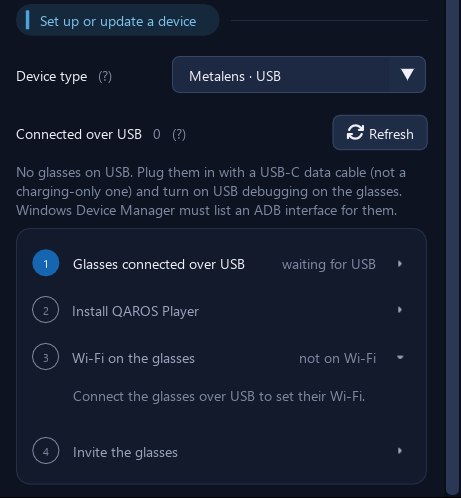
-
If it says Wi-Fi is off on the glasses, click Turn on (or just continue: Join turns it on).
-
Type the network name in Network, or open Saved and pick one. Networks this PC knows are offered, the one the PC is on first. Pick a 5 GHz network: one the glasses see only on 2.4 GHz starts with an amber 2.4 GHz, and picking it shows Only seen on 2.4 GHz: pick a 5 GHz network for streaming.
-
Set Security (WPA2 or Open) and type the Password. It is typed every time: the Visualizer never stores or logs it and does not read saved keys from Windows.
-
Click Join. It shows Joining <network>.
-
When the glasses report the network, the card shows On <network> · <address> in green, with Copy. On a 2.4 GHz network it adds This is a 2.4 GHz network: streaming will stutter. Join a 5 GHz network.
-
Pair the glasses in the next step, Pair the glasses (Pair a Headset That Joins by Itself).
To move the glasses to another network later, click Disconnect (the glasses forget the current network) and repeat from step 3. Turn Wi-Fi off switches Wi-Fi off on the glasses.
If it does not work
| The card says | Meaning |
|---|---|
| Connect the glasses over USB to set their Wi-Fi. | The cable is unplugged or charging-only |
| Set Wi-Fi on the glasses: they do not accept a network over USB. | The glasses' Android is older than 11. Set Wi-Fi on the glasses, then Check again |
| A notification after Join, password field empty again | Wrong password. Type it again |