Supported Apps
A supported app is a desktop application you already use, extended with a QAROS add-on or plugin. QAROS streams its 3D view into an app volume that everyone in the session sees.
| App | What streams | Added by | Visualizer installs it |
|---|---|---|---|
| Rerun | Rerun's 3D view, 2D views as panels, a timeline | the qaros-rerun viewer | Yes, Rerun tile |
| RViz (ROS 2) | The RViz2 scene, RViz panels, AR tools, video, picks | the qar_rviz_streaming plugin | Yes, ROS 2 Rviz tile |
| Blender | The open Blender scene, a controls panel | the QAROS ANARI Streaming add-on | Yes, Blender tile |
| 3D Slicer | Slicer's volume rendering, slice views as panels | the QAROS Live Renderer module | No, by hand |
How it works
Start any of them
- Install QAROS on the PC that runs the app (the Hub PC).
- Start QAROS and add a receiver first: Before You Start: Start QAROS and Add a Receiver. A fresh Visualizer has no receiver, so an app streams to nobody until you add one or start a paired headset.
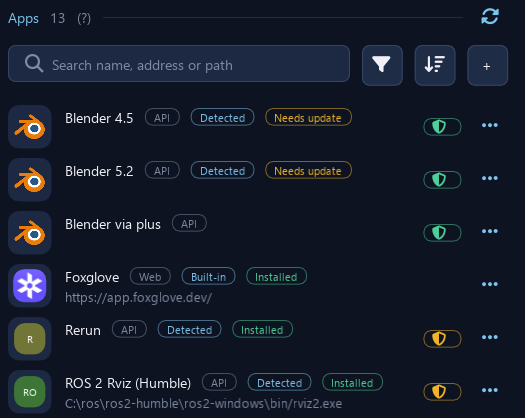
- Open Sources. In the Visualizer, open Sources (the Source Applications panel). Rerun, RViz and Blender each have a tile there.
- Install the plugin. Open the tile and press Install: QAROS downloads the app's QAROS add-on or plugin for you.
- Launch. Press Launch on the tile.
- Allow it once. The first start asks "Allow <app> to join QAROS?": click Allow (see Approved local apps).
- See it on a paired headset (Pair a Headset) or a Display Receiver (Stream to a 3D Monitor).
- Move it. Grab the app volume to move or rotate it, pinch with two hands to scale it (Moving and scaling app volumes).
- The Visualizer installs and updates add-ons and plugins from QAROS 0.10.0. With an older QAROS, install them by hand as each page says.
- Tiles, Locate..., presets, the + dialog and UI modes: Source Applications.
- Step by step with Blender: Blender, with a turbofan engine.
- Step by step with Rerun: Rerun, from a PC without Rerun to an example recording in the headset. Logging your own data, every option and building the viewer: The Rerun Viewer in the Developer Guide.
- To stream an app of your own: Developer Guide.