RViz (ROS 2)
What you get
Your ROS 2 system in AR: the live RViz2 scene from each viewer's own pose, RViz panels, AR tools from the ROS 2 graph, image topics as video, and headset picks published to ROS 2.
| Version | |
|---|---|
qar_rviz_streaming plugin | 0.3.0 |
| ROS 2 | Humble (prebuilt and checked). Jazzy and Linux do not build yet. |
| QAROS | 0.9.0 or newer. Install from the Visualizer: 0.10.0. |
| OS | Windows 11 x64 |
Full reference (every tab, environment variables, log messages): Running the RViz2 Plugin on Windows.
Before you start
Step 1 for every app: Before You Start: Start QAROS and Add a Receiver. Start QAROS, open the Visualizer and add a Display Receiver, or start the player app on a paired headset. A fresh Visualizer has no receiver: without one, the app streams to nobody.
Install
- ROS 2 Humble with a working
rviz2. QAROS does not repair a broken distribution: see the repair scripts. - Qt 5.15 (msvc2019_64): the Windows distribution ships none. QAROS looks in
QAR_QT_ROOT,Qt5_DIR, aqtfolder beside the distribution, its pixi environment,C:\Qt. - The plugin, from the Visualizer (recommended): open the ROS 2 Rviz tile, press Install (later Update).
- QAROS downloads the release for that distribution and checks its SHA-256.
- It unpacks it for your Windows user, without administrator rights.
- By hand: build and register it as in INSTALL.md. Your registered build shows as Detected and wins over a download.
Connect to QAROS
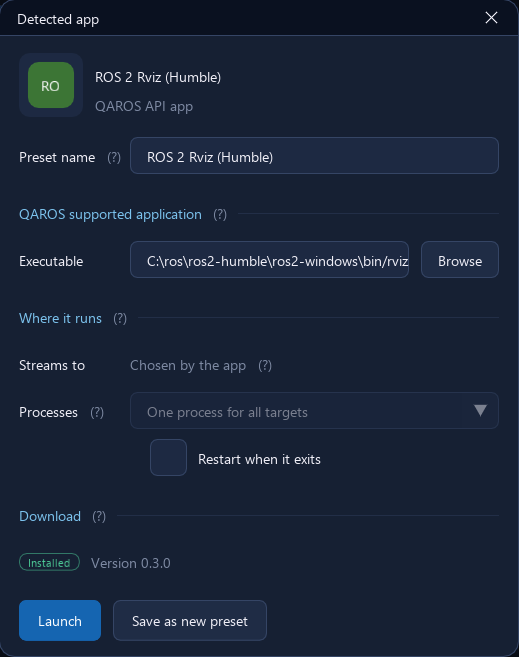
- Detection: one tile per distribution, for example ROS 2 Rviz (Humble).
- QAROS looks in
AMENT_PREFIX_PATH,C:\opt\ros\*,C:\dev\ros2_*,C:\pixi_ws\ros2-windows. - A folder counts when it has
local_setup.batorsetup.bat, andrviz2.exe.
- QAROS looks in
- Not found: a greyed-out ROS 2 Rviz row with Locate....
- Press Locate... (or Add ROS installation... in the Apps heading).
- Pick the distribution folder, with its setup script and rviz2.
- Every Refresh searches it from then on. See Locating an app QAROS did not find.
- Start it: click the tile, press Launch. With plugin 0.3.0 the panel joins by itself; an older plugin needs Connect to QarOS on the Connection tab.
- Allow it once: click Allow within 120 s (Approved local apps).
- Until then the panel reads waiting for approval in the QAROS Hub.
rviz2.exeis not code-signed: QAROS asks again after RViz2 is updated or replaced.
- Several distributions: each gets its own tile. For another configuration: ... > Duplicate as new preset, then change Executable or arguments (Developer UI mode).
First session
-
Open a target. A paired headset, or a Display Receiver (+ Add receiver in the Visualizer, Before You Start). A fresh Visualizer has no receiver: RViz has nothing to stream to until you add one.
-
Check the panel. It reads QarOS: connected (local app) - N target(s).
-
What you see:
In the room Does The RViz2 scene in a 10 m app volume RViz Scene Follows your own pose, not the RViz camera QAR control panel, about 1 m ahead Pick mode (Off / Point / Nav goal), Confirm pick, Cancel pick, panel and tool switches Displays (AR) and other RViz docks Real RViz widgets: clicks in AR reach them. Add more on the AR panels tab, Stream panel to AR. Video panels Image topics, up to 30 fps -
Pick. Choose a mode, point in the headset, confirm. Points go to
/clicked_point, goals to/goal_pose, initial poses to/initialpose. -
AR tools. AR tools tab > Add from ROS graph.... Publishing stays off until Allow publishing from AR; Publish and Send goal need a second press.
-
Move and scale the scene with the usual app volume gestures (Moving and scaling app volumes).
Tips and limits
- Several headsets: lower Resolution (default 1280x720) and FPS cap (default 60) on the Settings tab. At most 8 targets.
- AR tool pages are plain HTTP on a random port. If a headset cannot load them, pin it with
QAR_PANEL_WEB_PORTand allow it in the firewall. - RViz2 joins the Hub of its own PC only.
- RViz2 may crash when it closes (known issue).
Troubleshooting
| Problem | Fix |
|---|---|
| The tile says Qt was not found | Install Qt 5.15 or set QAR_QT_ROOT, then Refresh. |
| Stuck on waiting for approval | Click Allow in the QAROS prompt or under Sources > Waiting for approval. |
RViz2 dies on connect, SEH FAULT in qar_library_init | C++ runtime next to rviz2 too old: run the repository's fix_old_vc_runtime.ps1. |
| Connected, no targets, nothing streams | Open a headset or click Add receiver in the Visualizer. |
| Only the grid shows | Nothing is published: start your nodes or play a bag. |
| This program does not match what was approved | Revoke it under Approved apps, start RViz again. |