The Mixer
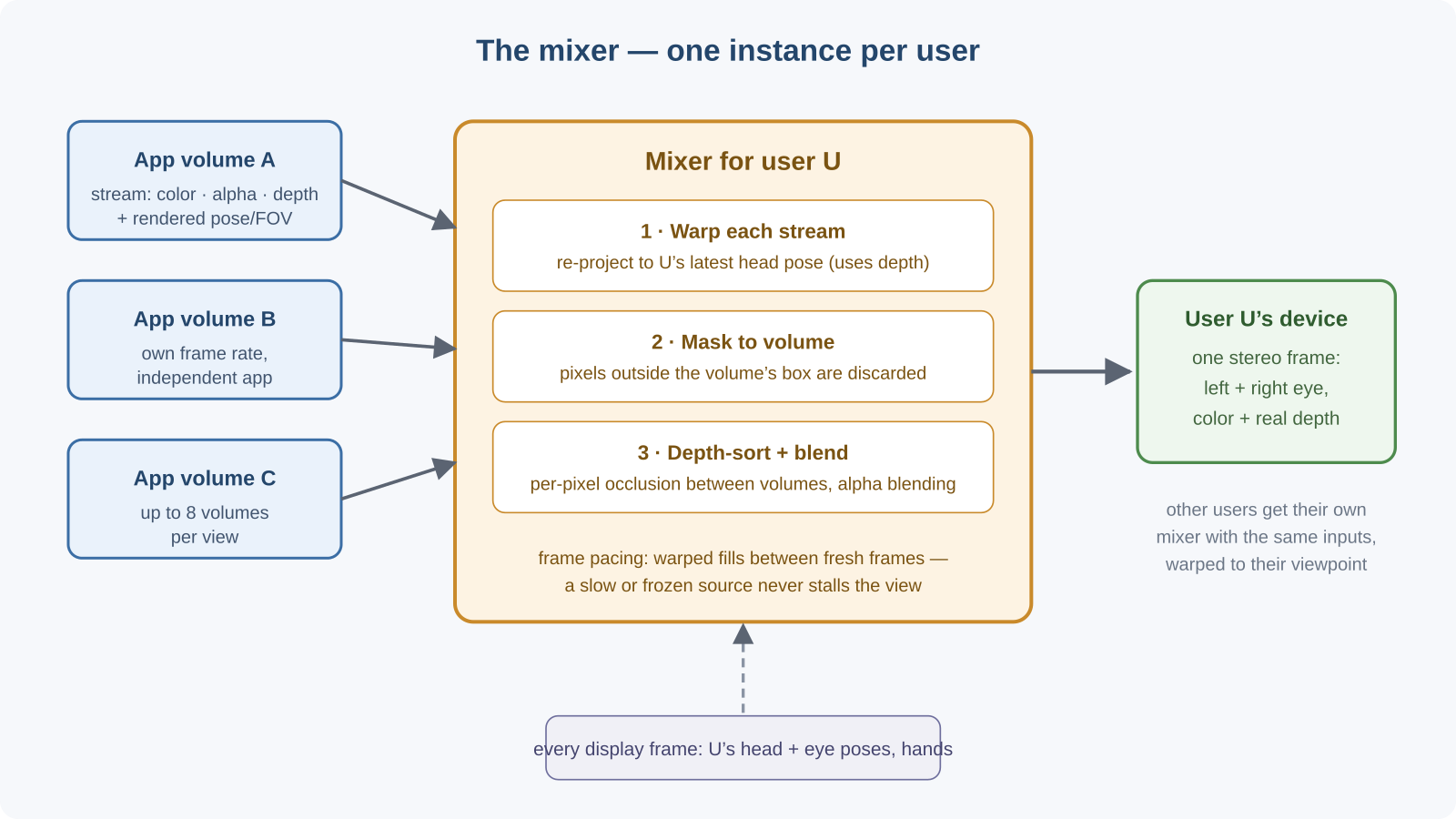
The mixer is the component that makes several independent applications look like one world. Each source application renders its own frames, at its own frame rate, with no knowledge of the others. The mixer takes all of those streams and produces, for each user, a single coherent stereo image that matches that user's own head pose at display time.
What problem it solves
Without a mixer, streaming AR/VR has two hard problems:
- Multiple sources, one view. A CAD tool, a data visualizer, and a camera feed each produce a separate video stream. The user needs to see all of them, correctly occluding one another, in one image.
- Latency. By the time a rendered frame crosses the network, the user's head has moved. Displaying stale frames as-is causes swimming content and motion sickness.
The mixer solves both at once: it warps (re-projects) every incoming stream to the viewer's freshest head pose, masks each stream to its app volume's box, depth-sorts and blends them, and outputs one stereo color + depth frame.
Inputs and outputs
In (one per app volume): each app volume corresponds to one stream entering the mixer. The frames carry color, alpha, and depth, plus the projection metadata (per-eye pose, FOV, near/far) they were rendered with.
Also in, every display frame: the viewer's latest head and per-eye poses, the current list of app volumes (for spatial masking), and optionally the viewer's hand joints (for ray/intersection tests against the mixed depth).
Out (one per user): a single blended stereo frame — two layers (left/right eye), color plus real depth — with output projection metadata attached, ready for the device to display or for the platform to compose further.
One mixer per user
Every user (target device) gets their own mixer instance. The content is shared — everyone sees the same app volumes — but each mixer re-projects that content to its own user's viewpoint every frame. That is what makes the experience personal: two users standing on opposite sides of a model each see the correct side, with correct occlusion, at their own head pose.
A single mixer composites up to 8 source app volumes into one view.
Relationship to app volumes
The app volume is the mixer's unit of work:
- Each incoming stream is keyed by its app volume ID.
- During blending, every stream is spatially masked to its volume's oriented bounding box: pixels are reconstructed to world positions and tested against the box, so an application can never draw outside its volume.
- Depth sorting between volumes happens per pixel using the streams' real depth, so a nearer volume correctly occludes a farther one even when they overlap.
Latency: asynchronous warping and frame pacing
Two mechanisms keep the experience smooth even when source applications are slow or hiccup:
- Late-stage reprojection (async warping). Just before compositing, each stream is warped from the pose it was rendered with to the pose the user's head has now, using the frame's depth. Head motion therefore stays responsive at display rate even if a source renders at half rate.
- Frame pacing. The mixer's receivers predict how far ahead each source should render and request frames "just in time". Fresh source frames interleave with warped fills; a single hitch or even a frozen source does not cascade into a permanent frame-rate collapse, and startup latency is capped so the stream comes up quickly.
Warping performance is observable: per-source timing reports (latency, upstream/downstream FPS, jitter) are published for each target and can be monitored live in the visualizer's warping monitor.
Depth and alpha
- Depth is first-class. The mixer consumes real depth from every source, uses it for occlusion and warping, and emits real depth in its output — so the device (or a further compositor) can continue to depth-blend correctly, and hand rays can be intersected with the mixed scene.
- Alpha is used for blending. Per-source alpha drives transparency during compositing, and empty regions stay fully transparent; occupied output pixels are emitted opaque by default.
Where it runs
The mixer runs on the Hub as part of the streaming pipeline, launched and placed automatically by the runtime launcher. Placement is flexible: it can share a process group with a local target application (the common low-latency case), run in its own process group, or serve a purely remote target device. As an operator or API user you do not manage the mixer directly — you configure source apps and target devices, and the pipeline planner inserts and places the mixer for you.