The QAROS World
This page is the non-technical view of QAROS: what is in the Shared Space, who participates, and how it behaves for everyday users.
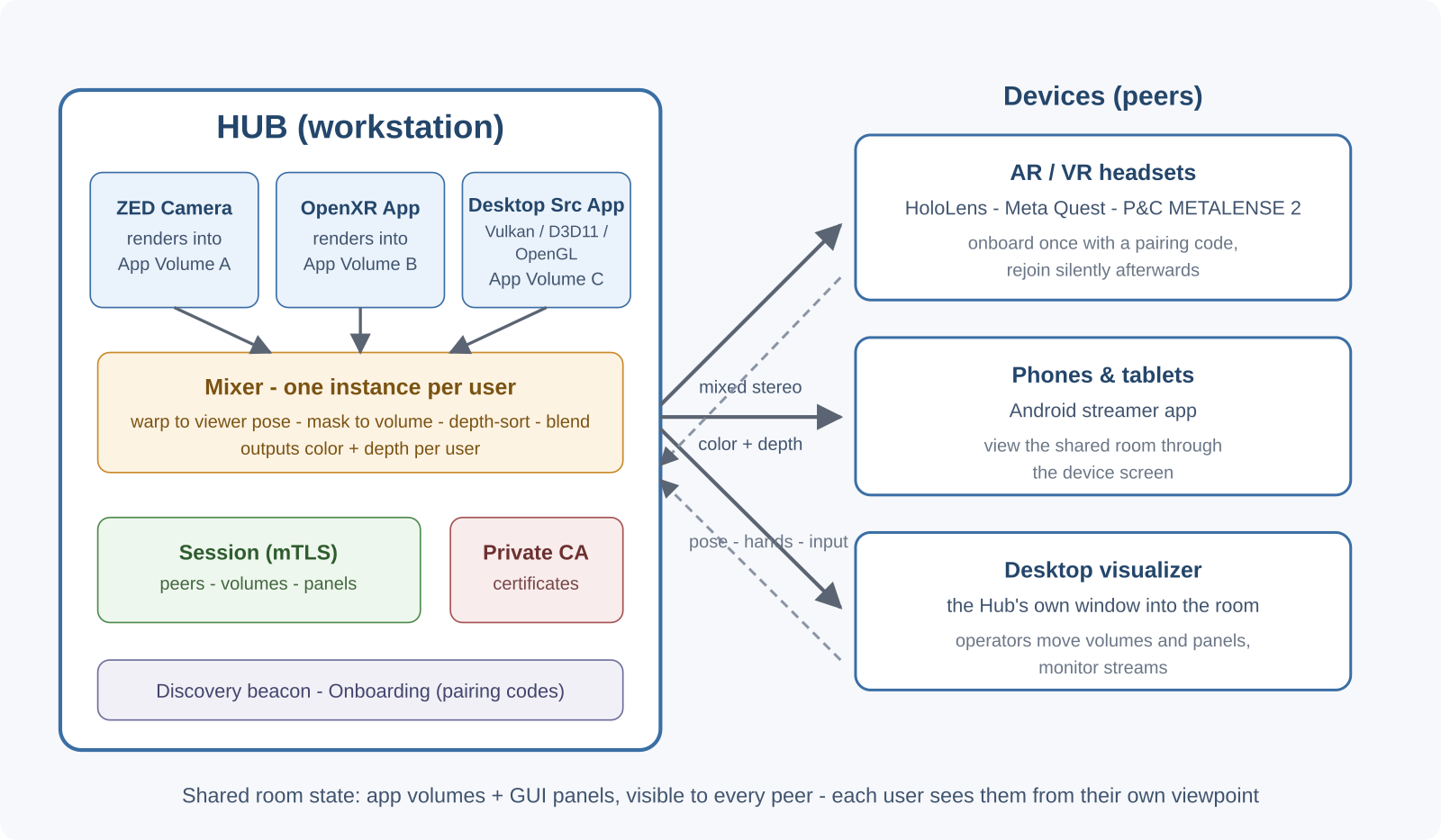
The Hub
The Hub is the central workstation that runs the QAROS runtime and the applications whose content is shared into the Shared Space.
From a user's point of view, the Hub:
- lets devices find and connect to the Shared Space,
- manages the Shared Space that everyone joins,
- runs the heavy rendering and mixing work,
- sends each device its own live view of the shared space.
Devices in the Shared Space
A device is anything that joins the Hub's Shared Space: an AR headset, a VR headset, an Android phone or tablet, the desktop visualizer, or a camera source.
In practical terms, devices in QAROS usually fall into two roles:
- Source apps add content into the Shared Space.
- Target devices view the Shared Space and send back user input such as head pose, hands, or controller actions.
You will also see the terms target app and player:
- A player is the small companion app that runs on an AR/VR device or Android phone.
- A target app is the broader runtime term for anything that receives the mixed output from the Hub. That includes players, but it can also include the desktop visualizer.
If you are integrating against the API and need the exact object model and naming, see Concepts.
Shared Space and session
The Shared Space is the collaborative place people join and work in together. Everyone in it sees the same app volumes and GUI panels, but from their own viewpoint.
In the Developer Guide and API, this same concept maps to a session. For basic use, it is enough to think of a session as the runtime's name for one Shared Space.
The room is only part of that idea: it is the physical area where people collaborate. One Shared Space can span multiple rooms while still sharing the same content in its app volumes.
From a user's perspective, joining a Shared Space is simple:
- you connect a device to the Hub,
- you enter or scan a pairing code when needed,
- after that first successful join, the device usually reconnects automatically.
The operator controls which devices are accepted, removed, or re-invited.
Shared Space alignment
Multiple AR devices can be aligned into the same physical space with a synchronization QR code.
- Download and print the QR code: room-sync QR code.
- If you need to generate your own, encode the text
qar-remoting:0_0_0_0;S. - Keep the white margins around the QR code intact. They make tracking faster and more reliable.
- The QR code is typically needed once per device and per location. After a device has scanned it in that room, it should not need to scan it again unless tracking is lost or the environment changes significantly.
- Place it on a horizontal surface that does not move over time. Tape it to a table or laptop so it stays fixed.
- If tracking is lost, walk back toward the QR code's position to reacquire it. You may occasionally be prompted to rescan it, but this is usually only needed in extreme cases.
App volumes
An app volume is a 3D area in the Shared Space where one application's content appears.
You can think of an app volume as a shared holographic workspace:
- it has a position and size in the Shared Space,
- users can move or resize it,
- it can contain anything from a tabletop model to a large immersive scene,
- the same volume is visible to everyone in the Shared Space.
If you need the exact coordinate and identity rules for app volumes, see App Volumes and Coordinate Systems.
GUI panels
A GUI panel is a 2D interface floating in the Shared Space, such as a settings page, dashboard, or web-based control surface.
Panels let people interact with tools and controls without leaving the shared space:
- panels appear at a specific place in the Shared Space,
- everyone can see the same panel unless it is intentionally restricted,
- panel content is typically a web page rendered into the shared environment.
For implementation details, see GUI Panels.
Streams
A stream carries rendered content from a source app into the Shared Space.
Users usually do not need to think about streams directly; what matters is that QAROS:
- sends each participant a live view,
- keeps the view responsive as they move,
- combines content from several sources into one coherent scene.
The mixer
The mixer is the Hub component that combines multiple source streams into one final view for each user.
This is why two people can look at the same Shared Space, from different places, and still each get the correct perspective on the same content.
For the operational and rendering details, see The Mixer or Rendering Streams.